Fonts
Duet loads .cpfont families from the SD card and organizes them as Serif, Sans Serif, Mono/Typewriter, Accessibility, Handwritten/Script, and Blackletter/Decorative. A complete six-size family provides 10, 12, 14, 16, 18, and 20 pt on both X3 and X4.
Download the Complete Duet Font Pack
Download all 123 font families
The 349 MB ZIP contains 738 validated .cpfont files, all six reader sizes, per-file checksums, exact upstream source links, and the applicable license notices. Its SHA-256 is 1d0b100683e05a3c2f9ad6e1fbf6f24c2c3674c3ee096ddfa32c383ccbf85c7c.
Choose an Installation Route
Choose whichever route fits how many fonts you want:
- Install the complete Duet collection: use the download above, unzip it, and copy the family folders you want from its
fonts/folder to/.fonts/or/fonts/on the SD card. - Install only a few ready-made families: connect the reader to Wi-Fi and open Settings > Reader > Font Options > Manage Fonts. This uses the credited 24-family CrossInk compatibility catalog.
- Choose individual families from their sources: open
FONT_PACK_SOURCES.tsvinside the complete pack or browse Font Sources, follow the upstream project link for the family you want, and convert the downloaded TTF/OTF files with Duet’s checked-in conversion tool. - Use CrossInk’s ready-made catalog on a computer: download compatible
.cpfontfiles from the CrossInk font releases, then copy them to/.fonts/or/fonts/.
You do not need to install the complete pack. The smaller on-device catalog and upstream-source route are there for readers who prefer a short, hand-picked font list.
Font Preview
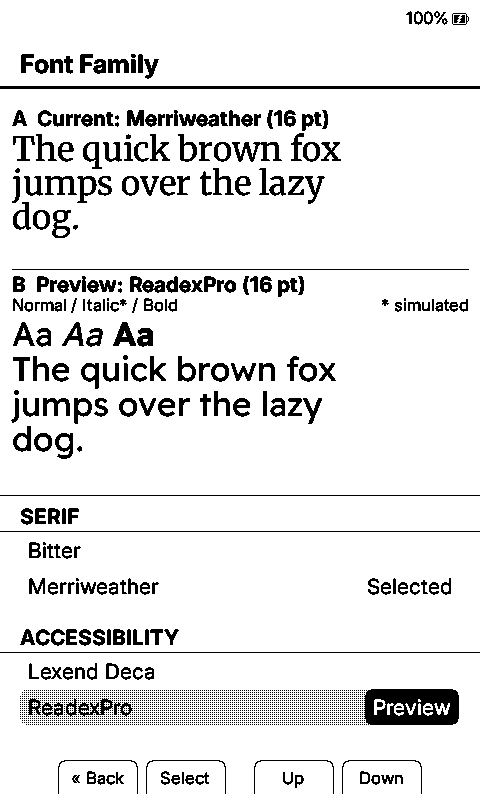
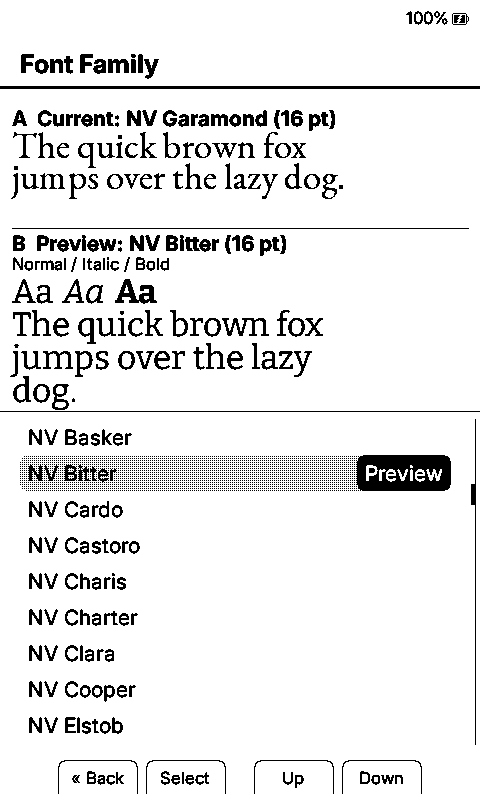
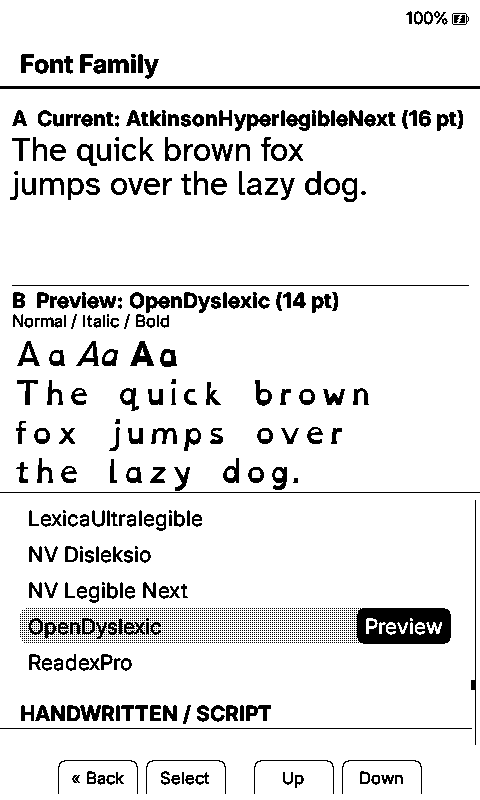
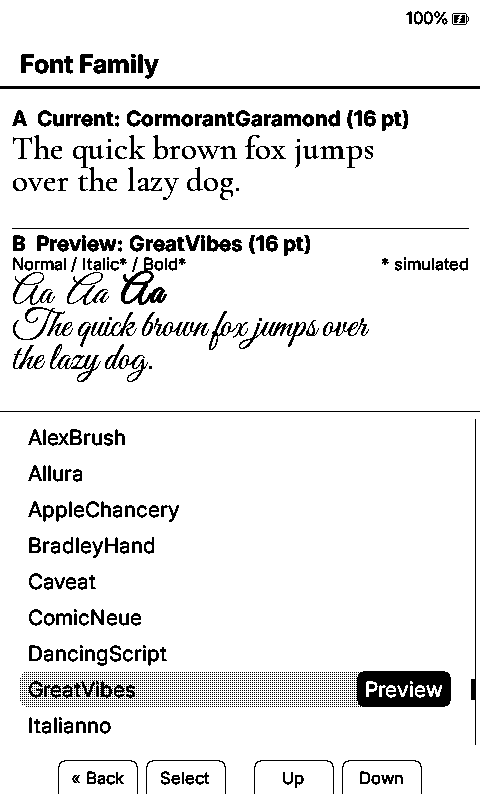
Each screenshot compares a different current family with a different preview family.
| Merriweather / Readex Pro | NV Garamond / NV Bitter | Atkinson Hyperlegible Next / OpenDyslexic | Cormorant Garamond / Great Vibes |
|---|---|---|---|
 |  |  |  |
Browse Every Font
Open the visual gallery of all 123 families
The gallery uses the actual public .cpfont files and Duet’s X4 simulator, so it shows the type as the reader renders it rather than substituting browser fonts. It opens with the e-reader-optimized families, then groups the complete collection by the same reading, accessibility, serif, sans, mono, script, display, and decorative categories used by the device picker. Every specimen is labeled with its exact pack-folder name.
Installing Fonts
There are three ways to install fonts:
Option 1: Download from device (recommended)
- Connect your Duet reader to Wi-Fi
- Go to Settings > Reader > Font Options > Manage Fonts
- Browse available font families and tap to download
- Downloaded fonts appear immediately in Settings > Reader > Font Family
Option 2: Upload via web browser
- Start File Transfer and connect through Join Network or Create Hotspot
- Open the web interface URL shown on the reader
- Navigate to the Fonts tab
- Upload
.cpfontfiles using the upload form
Option 3: Manual SD card copy
- Obtain compatible
.cpfontfiles from the complete Duet pack, the on-device catalog, the CrossInk font releases, or your own conversion of an upstream family. -
Copy font family folders to one of two locations on your SD card:
/.fonts/— hidden directory (preferred; keeps the SD root tidy when mounted on a desktop)/fonts/— visible directory (use this if your OS hides dot-files and you’d rather see the folder in your file manager)
Both roots are always scanned at boot and the results are merged: a family installed in
/fonts/shows up even when/.fonts/also exists, and vice versa. The two roots only collide if the same family name appears in both — in that case the copy in/.fonts/wins and the duplicate in/fonts/is ignored.SD Card Root/ ├── .fonts/ ← Hidden root (preferred) │ └── Literata/ │ ├── Literata_12.cpfont │ ├── Literata_14.cpfont │ ├── Literata_16.cpfont │ └── Literata_18.cpfont └── fonts/ ← Visible root (equally valid) └── Merriweather/ ├── Merriweather_12.cpfont └── ... - Insert the SD card and power on your Duet reader
On-Device Font Catalog
The in-device downloader reads the standard 24-family catalog generated by Duet’s checked-in lib/EpdFont/scripts/sd-fonts.yaml, using CrossInk’s existing compatibility endpoint. The catalog contains:
- Serif: Alegreya, Bitter, ChareInk, Gentium Book Plus, IBM Plex Serif, Literata, Lora, Merriweather, Noto Serif Extended, Source Serif 4, Tinos, Domitian, Libre Baskerville, and Vollkorn.
- Sans Serif: IBM Plex Sans, Inter, Lexend Deca, Noto Sans Extended, and Source Sans 3.
- Mono/Typewriter: IBM Plex Mono and Source Code Pro.
- Accessibility: OpenDyslexic, Atkinson Hyperlegible Next, and Lexica Ultralegible.
See Font Build Variants for the much smaller emergency fallback set embedded in each firmware BIN. See Font Sources for the open-source projects used by Duet’s broader font work.
Converting Custom Fonts
To convert your own TrueType/OpenType fonts:
Prerequisites
pip install freetype-py fonttools
Single font (one style)
python3 lib/EpdFont/scripts/fontconvert_sdcard.py \
  MyFont-Regular.ttf \
  --intervals latin-ext \
  --sizes 10,12,14,16,18,20 \
  --style regular \
  --name MyFont \
  --output-dir ./MyFont/
Multi-style font
python3 lib/EpdFont/scripts/fontconvert_sdcard.py \
  --regular MyFont-Regular.ttf \
  --bold MyFont-Bold.ttf \
  --italic MyFont-Italic.ttf \
  --bolditalic MyFont-BoldItalic.ttf \
  --intervals latin-ext \
  --sizes 10,12,14,16,18,20 \
  --name MyFont \
  --output-dir ./MyFont/
Available Unicode interval presets
| Preset | Coverage |
|---|---|
ascii | U+0020–U+007E (Basic Latin) |
latin1 | U+0080–U+00FF (Latin-1 Supplement) |
latin-ext | European languages (Latin + Extended-A/B + punctuation + ligatures) |
greek | Greek + Extended Greek |
cyrillic | Cyrillic + Supplement |
hebrew | Hebrew + Alphabetic Presentation Forms |
georgian | Georgian + Georgian Supplement |
armenian | Armenian |
ethiopic | Ethiopic + Extended |
vietnamese | Vietnamese subset (ơ/ư and combining marks) |
punctuation | General punctuation (U+2000–U+206F) |
cjk | CJK Unified Ideographs + Hiragana + Katakana + Fullwidth |
hangul | Korean Hangul syllables + Jamo + Compatibility Jamo |
cherokee | Cherokee (historic + supplement block) |
tifinagh | Tifinagh |
symbols | Math, currency, arrows, box-drawing, misc symbols, dingbats |
reading | Literary fiction coverage: Latin, Greek, Cyrillic, math/symbol blocks, supplemental punctuation, and CJK quote marks |
builtin | Matches the firmware’s built-in font conversion intervals |
Combine presets with commas: --intervals latin-ext,greek,cyrillic
You can also specify arbitrary Unicode ranges directly: --intervals latin-ext,(0x2100-0x214F)
To list all presets with codepoint counts:
python3 lib/EpdFont/scripts/fontconvert_sdcard.py --list-presets
Additional options
--force-autohint — force FreeType’s auto-hinter instead of the font’s native hinting (useful when a font’s built-in hints produce poor results at small sizes).
Install custom fonts via the web interface or manual SD card copy.